Your First Days in Star Citizen (2026)
Everything you need to know to get started in Star Citizen, from basic controls to your first mission.
TL;DR: When you first log in, you spawn in a habitation room at a major city (usually Lorville or New Babbage). Leave through the elevator, head to the spaceport, find an ASOP vehicle terminal to claim your starter ship, then grab a delivery mission from the MobiGlas (F1) to earn your first aUEC. The most common new-player mistake is forgetting to request landing permission (default: N key while approaching) — you'll get a fine or hostile response if you skip it.
Updated for Alpha 4.9 — July 2026.
Reading this before buying the game? CIG runs several Free Fly events each year where anyone can play for free for a week or two — everything in this guide works the same during one, so it's a no-risk way to spend your first days in the verse.
Step 1 — Your First Login
You'll spawn in a small habitation room. Don't panic — you're in a city. Here's what to do:
- Press I to check your inventory. You start with a basic undersuit and MobiGlas.
- Press F near the door panel and select the elevator to leave your habitation floor.
- Follow signs to the Spaceport or the transit system (metro/tram) — look for the ship icon on directional signs.
- At the spaceport, find an ASOP terminal (ship management kiosk) to claim and retrieve your starter ship.

Essential On-Foot Controls
- W / A / S / D — Move
- Spacebar — Jump (or ascend in zero-G)
- Ctrl — Crouch (or descend in zero-G)
- Shift — Sprint
- F — Interaction mode (hold and look at objects/panels)
- I — Personal inventory
- F1 — MobiGlas (missions, map, communications)
- F11 — Commlink / Communications app
Step 2 — Claiming Your Ship
- Locate an ASOP terminal in the spaceport — they look like yellow kiosks with a ship hologram.
- Interact with it (F) and select Claim or Retrieve next to your starter ship.
- A hangar or pad number is displayed — follow the signs or take the elevator to that level.
- Walk up to your ship and board it via the entry ramp or hatch.

Basic Flight Controls
- R — Start engines (Flight Ready toggle)
- N — Landing gear up/down
- W / S — Forward / backward thrust
- A / D — Strafe left / right
- Space — Strafe up
- Ctrl — Strafe down
- Q / E — Roll left / right
- Mouse — Pitch and yaw
- B — Switch to NAV mode (first step of quantum travel)
- F4 — External camera
Step 3 — Your First Mission
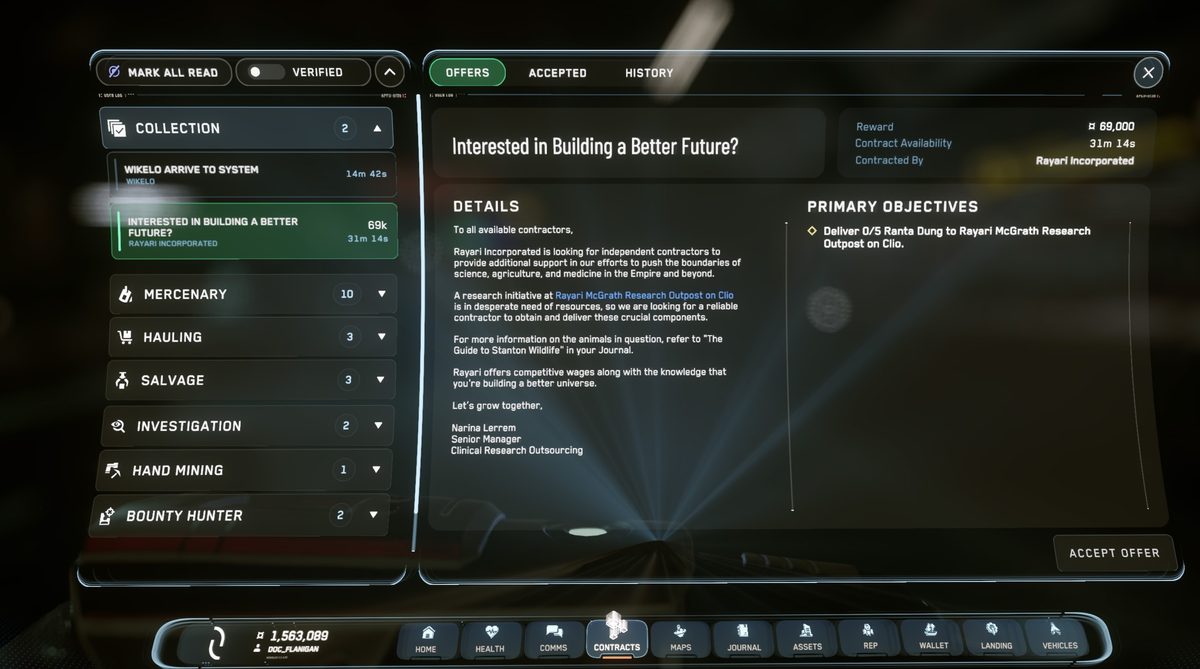
- Press F1 to open your MobiGlas.
- Select the Missions Manager app (briefcase icon).
- Look for Delivery or Investigation missions — these are the most beginner-friendly.
- Accept one and follow the objective markers.
Important Tips
- Request landing permission before approaching any landing pad — ignore this and you'll get fined or fired on.
- Monitor oxygen when doing EVA (spacewalk) — your suit has a finite supply.
- Store valuables in your persistent inventory at major hubs before logging out.
- Ask in global chat (F12) — the community is genuinely helpful to new players.
- Want to play with a friend? See our How to Add Friends in Star Citizen guide.
Frequently Asked Questions
New to Star Citizen? DayOneCitizen.com has a complete first-30-days guide written for brand new players.