Star Citizen Fleet Viewer & Tools
A Star Citizen CCU calculator guide, the StarJump Fleet Viewer, and other community tools — upgrade planning, fleet management, and reference resources in one place.
Featured: Star Citizen CCU calculator guide
The CCU calculator we recommend is CCU Game (ccugame.app) -- a free community tool that manages your hangar and builds optimal upgrade chains automatically. Here's how CCUs work and how to use CCU Game to plan yours.
What is a CCU in Star Citizen?
A Cross-Chassis Upgrade (CCU) lets you upgrade from one ship to another by paying only the price difference between them. Instead of buying your target ship at full retail, you buy a cheap starter package and CCU your way up -- paying smaller incremental amounts at each step rather than the full price.
CCUs can be purchased in advance and held in your hangar indefinitely. This means you can lock in a low price during a sale today and apply the upgrade weeks or months later -- the savings are permanent. The catch: chains are fiddly to plan by hand. That's the problem CCU Game solves.
Buying your very first ship rather than upgrading one? Start with the first ship guide on DayOneCitizen before planning a CCU chain.
Manage your hangar with CCU Game
CCU Game is more than a calculator -- it's an asset manager for your whole RSI account. Import your hangar and it shows every ship, package, CCU, and buyback you own in one view, with current values, so you plan upgrades around what you already have instead of guessing.
- See your fleet at a glance -- every pledge, its melt value, and any unapplied CCUs sitting in your hangar.
- Track your buybacks -- ships and CCUs you've melted stay in the picture, so a chain can route through something you can buy back cheaply.
- Plan with what you own -- the chain planner factors in CCUs you already hold, so you never re-buy a step you have.
CCU chain example: a real chain in CCU Game
This is an actual chain built in CCU Game -- from a Gladius all the way to a Corsair ($250 retail) for a total pledge cost of $65, with only $50 needed to finish it today.
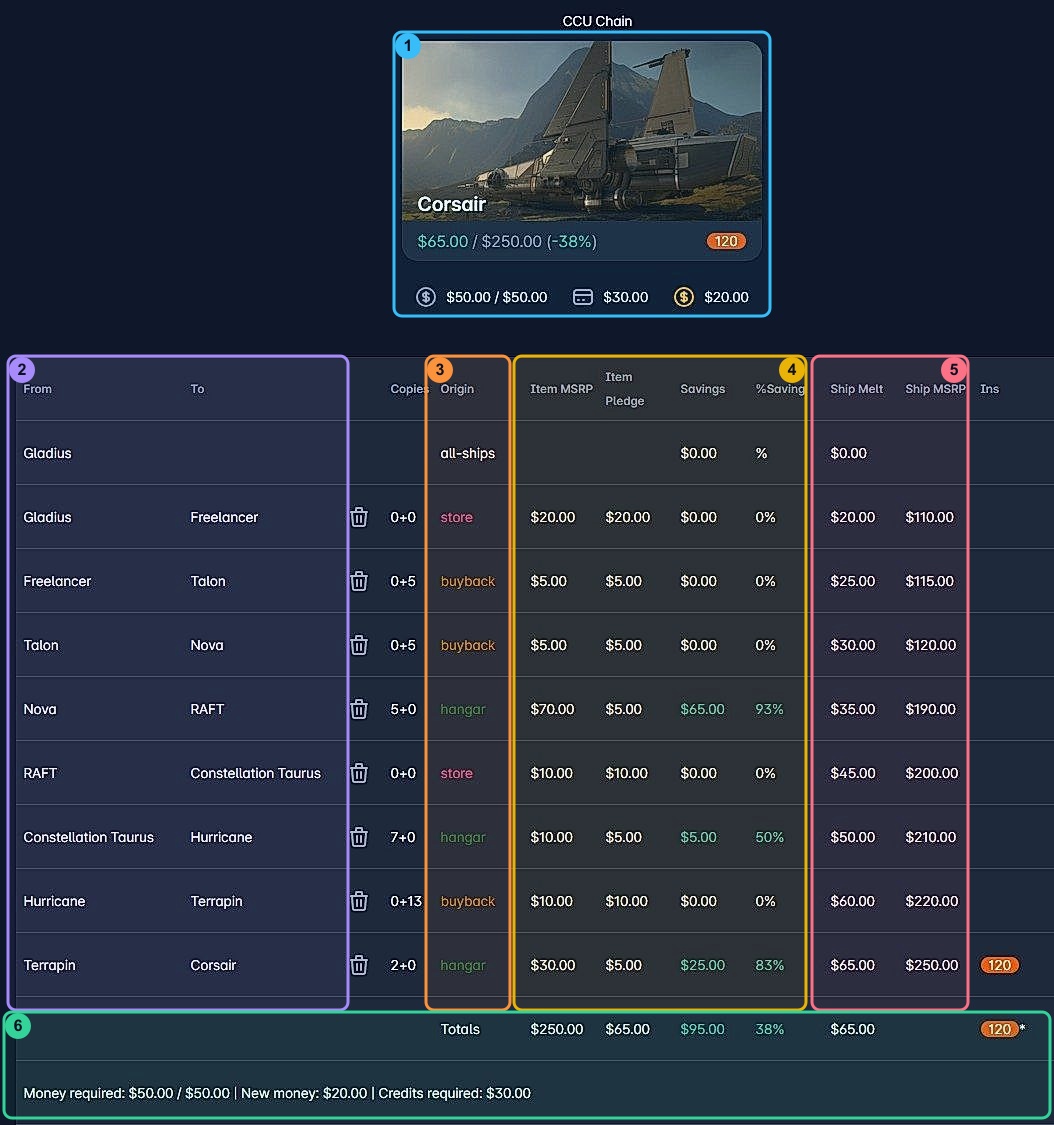
Small text at this size? Click the image to open it full size.
Your chain will differ -- prices, sales, and your own hangar all change the math. CCU Game recalculates the optimal path from live data.
How to Chain CCUs with the CCU Calculator
Common CCU Questions
Essential community tools
Calculate profitability between trade routes, find the best commodities, and maximize your hauling profits.
- * Real-time pricing data
- * Profit per unit calculations
- * Route planning optimization
- * Ship cargo capacity reference
Calculate mining yields, find the most valuable minerals, and track resource prices across the verse.
- * Mineral value database
- * Refining calculator
- * Mining location finder
- * Equipment comparison
Navigate the Star Citizen universe with the detailed map showing planets, moons, stations, and points of interest.
- * Complete star system mapping
- * Points of interest database
- * Jump point connections
- * Resource locations
Build and optimize ship loadouts with the interactive tool. Compare components, weapons, and equipment.
- * Component database
- * Power management calculator
- * DPS calculator
- * Heat management analysis
Find any item, component or ship part across the Star Citizen universe with location and price information.
- * Complete item database
- * Location tracking
- * Price comparison
- * Stock availability
Advanced ship upgrade calculator with CCU chains, warbond discounts, and upgrade path optimization.
- * CCU chain builder
- * Price tracking & history
- * Optimal upgrade paths
- * Warbond discount finder
Manage your ship collection, track maintenance, and plan upgrades with this comprehensive fleet management tool.
- * Ship inventory tracking
- * Component inventory
- * Upgrade planning
- * Fleet composition analysis
Essential tool: StarJump Fleet Viewer


Want to Contribute?
Have knowledge of a useful Star Citizen tool that's not on our list? We welcome tool submissions from experienced players.
Submit Your Tool