Creating and Managing Parties in Star Citizen (2026)
A step-by-step guide to forming parties, inviting players, maintaining party chat, and coordinating group activities.
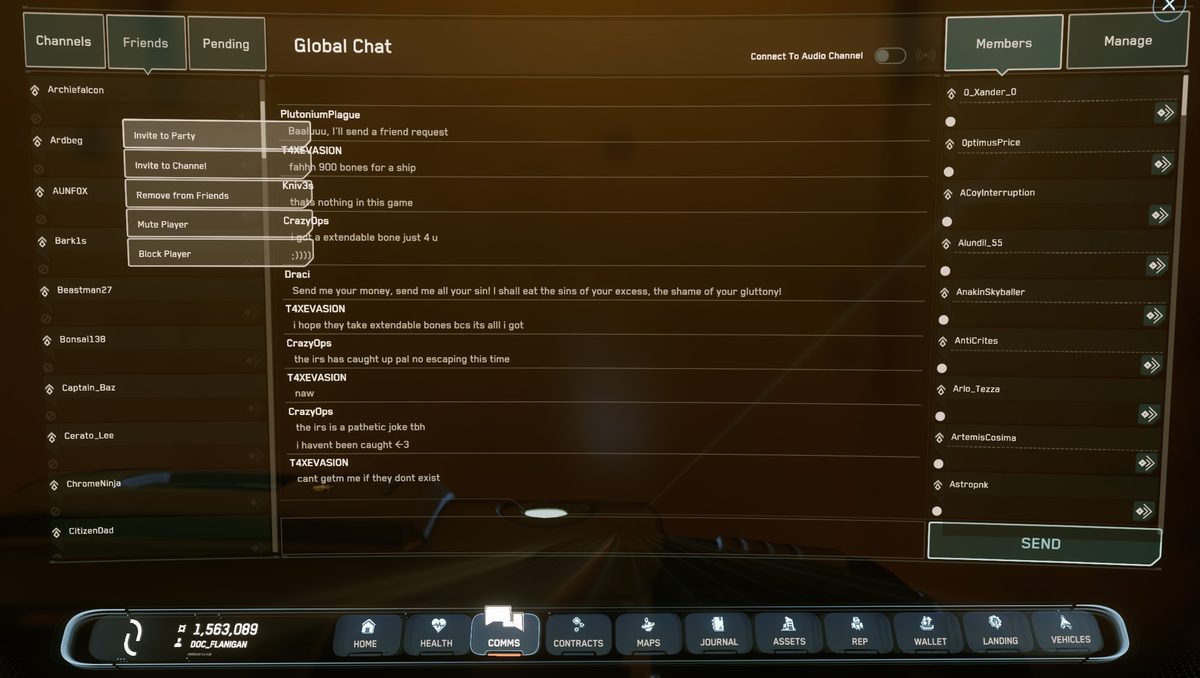
TL;DR: To invite a friend to a party, press F11 to open the Commlink, click the Friends tab, right-click their name, and select Invite to Party. Once everyone accepts, the party leader clicks Enter Universe from the main menu and the whole party routes to the same shard automatically. If you're already in-game and need to join their shard, leave to the main menu, accept their invite, then re-enter.
Last updated: May 10, 2026. Not on someone's friends list yet? See our How to Add Friends guide first.
What a Party Does
- Shows party members' positions on your HUD as friendly markers.
- Routes all members to the same shard when entering the universe from the main menu.
- Enables quantum linking — the pilot initiates a quantum jump and all linked party members in the same ship or nearby ships jump together.
- Shares mission objectives so everyone sees the same waypoints.
- Unlocks a dedicated party chat channel in the Commlink.
Method 1 — Invite from the Friends List (F11)
- Press F11 to open the Commlink.
- Click the Friends (Contacts) tab.
- Right-click the friend's name.
- Select Invite to Party from the context menu.
- Wait for them to accept — they'll see the invite in their Commlink.
Method 2 — Invite via mobiGlas Contacts
- Press F1 to open the mobiGlas.
- Open the Contacts Manager app.
- Find the player and click Invite to Party.
Getting onto the Same Shard
Star Citizen shards are isolated server instances. To play together, you must be on the same shard.
- Best method — enter universe together: Form the party at the main menu before anyone clicks Enter Universe. The party leader enters, and the rest follow — the game routes everyone to the same shard.
- Already in-game: Leave to the main menu, accept the party invite there, then re-enter. You'll route to the party leader's shard.
- Still on different shards: This can happen during heavy loads. Both players leave to main menu, re-form the party, and re-enter.

Party Leader Responsibilities
- Automatically assigned to the party creator.
- Controls quantum linking — initiates quantum travel for the group.
- Can share missions so all members see the same objectives.
- Can transfer leadership to another member via the party screen.
- Can remove members if needed.
Multi-Crew Ships
To let party members board and operate your ship, set access permissions from the ship's mobiGlas or vehicle management screen. By default, only the owner can operate the ship's critical systems. Set permissions to Friends or Party to allow crew access.
Frequently Asked Questions
New to Star Citizen? DayOneCitizen.com has a complete first-30-days guide written for brand new players.