Beginner
Featured
Inventory
Storage
Items
Gameplay
Managing Your Inventory in Star Citizen (2026)
A detailed guide on how to efficiently manage your local and ship inventory, transfer items, and optimize storage space.
Updated: 5/10/2026
TL;DR: Star Citizen inventory has two layers — your personal inventory (items on your character, follows you everywhere) and local storage (habitat, ship cargo hold, outpost terminal — stays put until you retrieve it). Press I to open the screen, then drag items between the left panel (personal) and right panel (location/ship). Always move valuables out of your ship's hold before claiming it — insurance reclaim destroys the cargo.
Last updated: May 10, 2026.
Inventory Types
- Personal inventory: Items on your character — armor, weapons, consumables. Capacity depends on your equipped armor and backpack. Travels with you everywhere.
- Backpack: Additional storage you wear. Increases personal carry capacity significantly.
- Local storage: Location-specific (habitat room, outpost storage terminal). Large capacity but tied to that location. Persists between sessions.
- Ship inventory / cargo hold: Storage attached to your ship. Cargo (SCU boxes) goes in the hold; small items go in the ship's inventory panel. Lost if the ship is destroyed without recovery.
How to Transfer Items
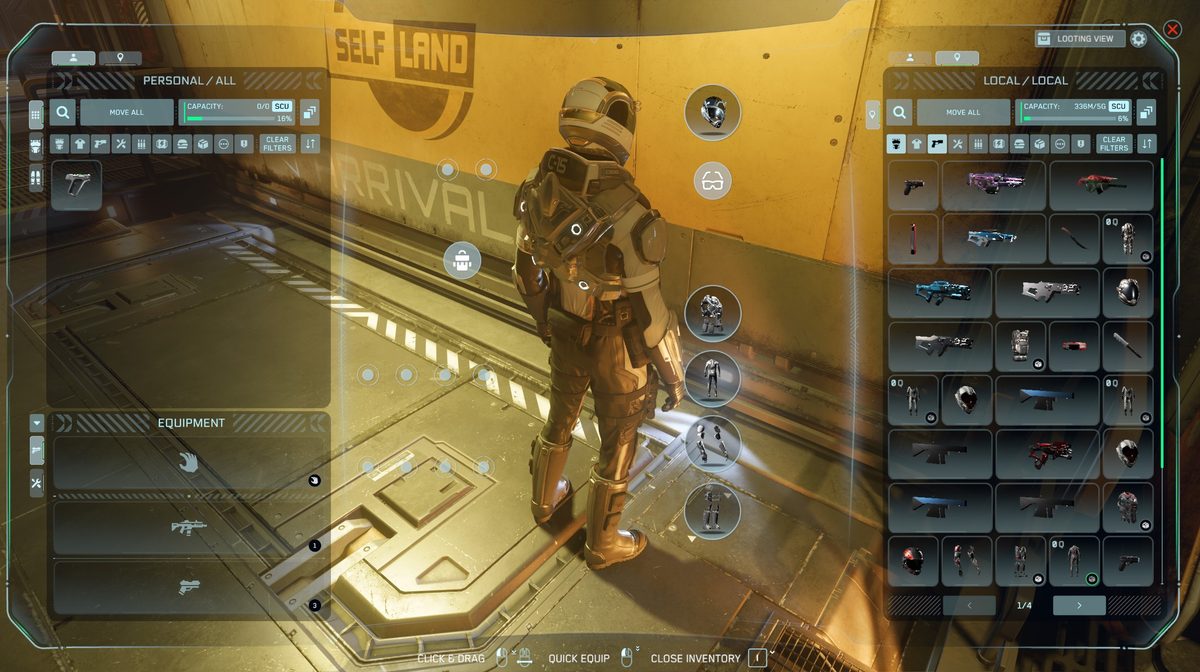
- Press I to open the inventory screen.
- Make sure you're near your ship or storage terminal — items can only be transferred when both inventories are in range.
- Drag items from the left panel (personal) to the right panel (location/ship) or vice versa.
- For bulk moves, right-click an item and choose Transfer all or use the stack transfer button.
Storage Persistence Rules
- Personal inventory items persist between sessions and across servers.
- Local storage (habitat, outpost) persists — items stay there until you retrieve them.
- Ship cargo hold persists if the ship is intact — but cargo is lost if the ship is destroyed.
- Claiming a ship (insurance reclaim) destroys the current hull including everything in it — always unload cargo before claiming.
Organization Tips
- Pick a home base: Keep your main loadout and valuables at one station you visit frequently.
- Ship specialization: Dedicate different ships for different roles — don't mix combat loadouts with cargo hauling in the same ship inventory.
- Sell regularly: Loot and commodities pile up fast. Visit a Trade & Development Division (TDD) terminal to sell excess.
- Cargo planning: Check SCU capacity before buying trade goods — 1 SCU ≈ 1.95m³. Know your ship's hold size.
Frequently Asked Questions
New to Star Citizen? DayOneCitizen.com has a complete first-30-days guide written for brand new players.